Freestyle Beats
Press Play and a West Coast drum loop starts at 96 BPM and keeps going until you stop it. Set the tempo, switch the pattern and rap. Free, no sign-up.
Free·No sign-up·Loops nonstop·96 BPM start
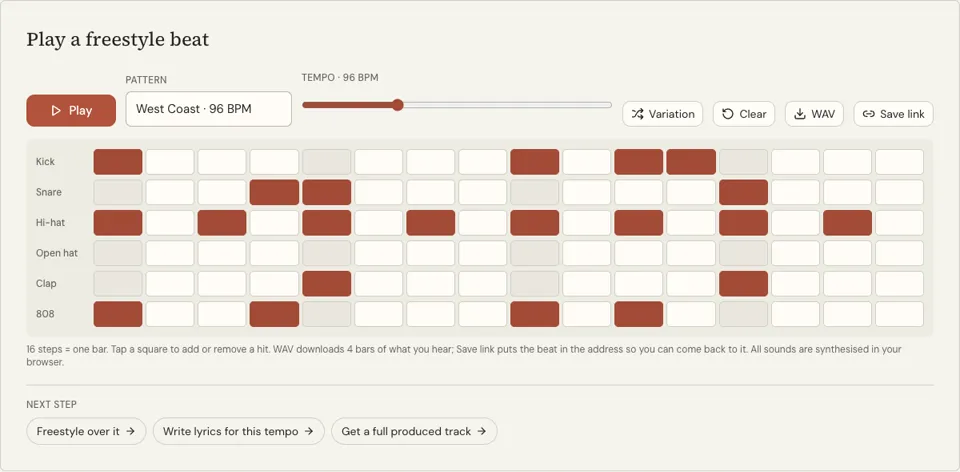
Play a freestyle beat
16 steps = one bar. Tap a square to add or remove a hit. WAV downloads 4 bars of what you hear; Save link puts the beat in the address so you can come back to it. All sounds are synthesised in your browser.
Five freestyle beats to play now
Press play and rap. Each beat runs 100 seconds and loops. They were made with the AI beat maker on this site, so there is no producer tag and no artist behind them.
Dusty boom bap
about 92 BPM
Soul sample
about 90 BPM
Lo-fi keys
about 80 BPM
Sad piano trap
about 140 BPM, half-time
Rage
about 150 BPM
See it in action
What these freestyle beats are
This is a drum loop built to be rapped over. It opens on the West Coast pattern at 96 BPM: kicks on steps 1, 4, 9 and 11, snare and clap together on beats two and four, steady eighth-note hats and an 808 that follows the kick. It is one bar long and repeats until you press Stop.
Four more loops sit in the Pattern menu, Boom bap at 90, Trap at 140, Drill at 142 and Lo-fi at 78, and the Tempo slider reaches from 60 to 180 BPM. That covers slow practice, mid-tempo cyphers and double-time drills from one page.
Because the loop is a live 16-step sequencer, you can also thin it out. Switch off the hats for a bare kick and snare, or press Variation for a slightly different bar. The drums are synthesised in your browser and there is no melody. WAV saves four bars of the loop as a file, and Save link keeps your version as an address.
Why freestyle over this beat
It does not end after three minutes
A video instrumental stops, fades or cuts to something else mid-verse. This loop holds the same bar until you stop it, which is what long practice sessions need.
Tempo under your thumb
When your flow falls apart, slow the beat instead of quitting. Drop to 80 BPM, rebuild the rhythm, then climb back in steps of five. No reloading, no searching for another track.
Drums only, so the words stand out
With no melody or sample on top, you hear every syllable against the kick and snare. Timing mistakes are exposed, and timing is the first thing a freestyler has to fix.
How to freestyle over the beat
- 01
Press Play
The West Coast loop begins at 96 BPM. Count "one, two, three, four" with the darker squares for a couple of bars before you start rapping.
- 02
Find your tempo
Slide the tempo down if you are tripping over words and up if you are waiting for the beat. Try another pattern from the menu when you want a different bounce.
- 03
Rap in four-bar blocks
Aim to land a rhyme on the last snare of each bar for four bars, rest for one, and go again. Short blocks keep you from running out of breath and ideas.
How to pick a beat to freestyle on
Mid-tempo is the friendliest. Between 85 and 100 BPM there is time to think of the next rhyme while finishing the current bar, and the snare on two and four gives a clear target. The West Coast preset sits in that pocket, with a bouncing kick that keeps energy up without rushing you.
Faster beats near 140 BPM are easier than they look if you treat them as half time and pace your words to the slow backbeat on beat three. Slower beats under 80 expose pauses, so they are good for practising control. When you want prompts as well as drums, the freestyle rap word generator plays a loop and shows a random word every few seconds.
- First sessions: 85 to 100 BPM, snare on two and four
- Breath control: under 80 BPM
- Speed work: 130 BPM and up, counted in half time
- Variety: change the pattern every few minutes
Freestyle beats FAQ
Are the freestyle beats free?
Yes. All five loops are free to play with no sign-up, and they run for as long as you leave them playing. Nothing on this page uses credits.
Can I download the beat?
Yes. The WAV button downloads four bars of the loop as a WAV file, free, so you can repeat it in another app or play it from your phone. It does not make MP3s or longer exports. Save link stores your tempo and pattern in a link. For a full instrumental to download, the AI beat maker charges 4 credits.
Why West Coast at 96 BPM?
It is a comfortable mid tempo with a strong backbeat and a syncopated kick, so it feels lively while leaving space to think. If you prefer a straighter or slower loop, pick Boom bap or Lo-fi from the Pattern menu.
Is there a version that gives me words to rap about?
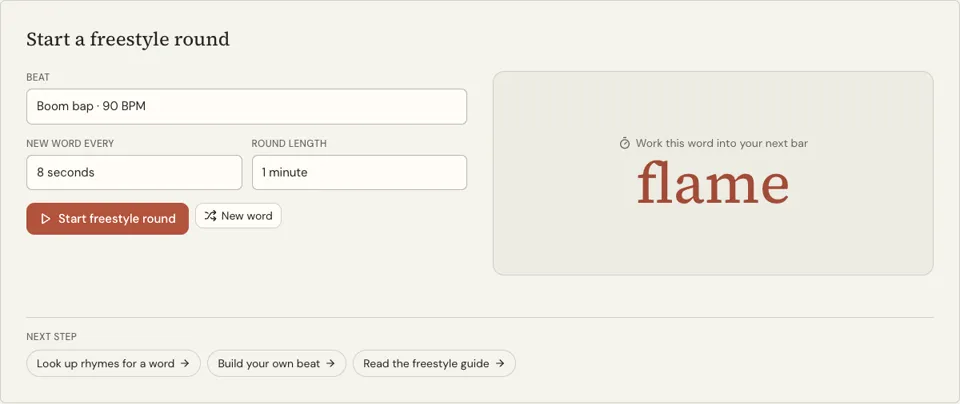
Yes. The freestyle rap word generator pairs a drum loop with a random word every 4, 8, 12 or 20 seconds in timed rounds. It is the next step once rapping over the bare loop feels easy.
Can I record myself freestyling over it?
The page does not record. Play the loop through a speaker and use your phone’s voice recorder, or use screen recording with microphone audio switched on to capture voice and beat together.
Does the beat have a melody?
No. It is drums and an 808 bass hit, nothing else, which keeps your attention on rhythm and words. For a produced instrumental in a chosen style, generate one in the AI beat maker.
Related reading
Related tools
Freestyle Word Trainer
Press start and a drum loop plays while a new random word appears every few seconds. Work each word into a bar before the next one lands. Free, no sign-up.
How to Freestyle Rap
Follow the drills in order and you will be able to improvise for two minutes over a beat without stopping. Each drill has a duration, a tempo and a clear pass mark.
Rap Beat Maker
Press Play and a boom bap loop starts at 90 BPM. Tap squares on the 16-step grid to change the kick, snare, hats, clap and 808, then write to it. Free, no sign-up.
Freestyle Rap Generator
Enter a topic or three words to hit and receive one loose, punchy verse in seconds, written the way a freestyle sounds. No cost and no account.
Last updated November 12, 2026