AI Beat Maker
Pick a style, press Generate beat and get a rap instrumental in about a minute, with no vocals, as an MP3 download. Each beat costs 4 credits.
4 credits per beat·No vocals·MP3 download·About a minute
Generate a beat
See it in action
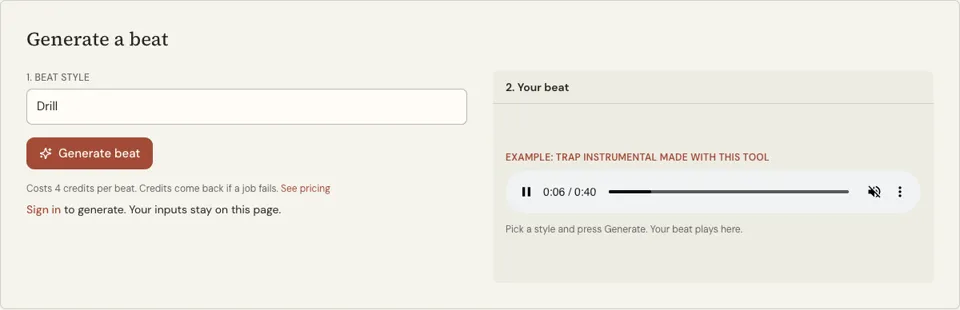
What this AI beat maker produces
One control decides the result: the Beat style menu. Choose from Boom bap, Trap, Drill, Melodic rap, Old school, West Coast, Lo-fi rap, Jersey club, Grime and Cloud rap, press Generate beat, and an AI music model returns an instrumental in that style. There is no lyrics box on this page because there is no vocal.
The model is asked for hard drums, a clear 808 or bass line and a loop-friendly arrangement. Each press makes a new beat, so two runs of one style will not sound the same. You cannot set an exact BPM or key; the style choice carries that. There are no artist presets and no box for an artist’s name.
The beat plays on the page when it is ready and saves as an MP3. For drums you place by hand, the free drum machine pages on this site give you a 16-step grid instead.
Why use an AI beat maker
A finished audio file, not a loop kit
You get one mixed audio file with drums and bass already in place, ready to rap over. There is nothing to sequence and no software to install.
Ten rap styles in one menu
The list covers the main lanes of hip hop, from dusty Boom bap to Jersey club. Trying a verse over three different styles costs three generations and a few minutes.
Clear cost, credits back on failure
A beat is 4 credits every time. If the job errors out, the credits return to your balance, so you only pay for audio you actually receive.
How to use the AI beat maker
- 01
Sign in and pick a beat style
Open the Beat style menu and choose one of the ten options. Think about the tempo you rap at: Lo-fi rap and Boom bap run slower, Trap, Drill and Jersey club run faster.
- 02
Press Generate beat
The button shows "Producing…" while the model works. It takes about a minute, and the tab can sit in the background.
- 03
Listen and download
Play the beat in the result panel. If it suits your verse, press MP3 to save the file. If not, generate again for a different take on the same style.
Which beat style fits your verse
Start from your natural pace. Rap your verse with no music and tap your foot: a slow, heavy tap points to Boom bap, Old school or Lo-fi rap, while a quick tap points to Trap, Drill, Grime or Jersey club. West Coast sits between, with a bounce that suits laid-back delivery.
Then think about mood. Melodic rap and Cloud rap leave space for sung lines and reflective writing. Drill and Grime are cold and tense, built for short, punchy bars. Picking a beat against the mood of the lyrics can work, but do it on purpose.
- Boom bap, Old school: storytelling and wordplay
- Trap, Drill: short bars, heavy low end
- Melodic rap, Cloud rap: sung hooks, open space
- West Coast: bounce and laid-back flows
- Grime, Jersey club: fast, high-energy delivery
How to choose between two takes of a beat
Because every press makes a new instrumental, the practical way to work is to generate two or three in one style and choose. That is 8 or 12 credits, so listen with a purpose. Rap your verse over each take from the top without stopping, and judge these five things.
- Pace: you finish each bar without rushing or dragging
- Space: the melody leaves room in the middle for a voice
- Low end: the 808 or bass does not swallow your words on phone speakers
- Shape: there is a clear place where a hook could lift
- Length: it runs long enough for the verses and hooks you have planned
Writing and recording over the MP3
Find the count first. Nod along and say one, two, three, four; the snare or clap usually lands on two and four. Four counts make one bar. Play the beat through and note the time at which each section changes. Many rap songs alternate 16-bar verses with 8-bar hooks, but write to the sections your beat actually has.
To record, play the beat in headphones so it does not leak into the microphone, and keep the vocal on its own track in whatever recording app you use. Set the beat a little quieter than feels natural while you rap, since a voice that has to fight the music sounds strained. Before you release a song built on a generated instrumental, read the terms on this site and your distributor’s rules on AI-made audio.
Ai beat maker FAQ
How much does a beat cost?
Each instrumental costs 4 credits and requires a signed-in account. Pack prices are listed on the pricing page. A failed generation gives its credits back automatically.
Is there a free beat maker on this site?
Yes. The rap beat maker and the other drum machine pages are free: a 16-step sequencer with six drum sounds that plays in your browser. Its WAV button saves only a four-bar drum loop with no melody, which is the main reason to use the AI version.
Can I download the beat?
Yes. When the beat is ready an MP3 button appears next to the player. The file saves to your device like any other download.
Can I choose the BPM or key?
Not directly. The style you pick steers tempo and feel, and each generation makes its own choices within that style. If a beat is too fast or slow, try a neighbouring style or generate again.
Can I ask for a beat in the style of a specific artist?
No. The page takes a style from the menu and nothing else, so there is nowhere to type a name. Punchline tools make original material and do not imitate real artists, their songs or their producers.
How do I add my voice to the beat?
Two routes. Record yourself over the MP3 in any recording app, or paste your lyrics into the AI rap generator, which produces a complete track with an AI vocal for 20 credits.
Related reading
 How to Record a Rap Song Online FreeHow to record a rap song online free in a browser: pick a beat, set up headphones, sync the mic, keep the right take, then mix and download a WAV or MP3.
 Type Beat Meaning: What the Label Tells a RapperType beat meaning in plain words: how producers name beats after a style, what free, lease and exclusive tags allow, and how to make the sound yourself.
Related tools
AI Rap Generator
Paste your lyrics, pick a style and get a full rap track with vocals and a beat in under a minute. Each track costs 20 credits with one free redo; an eligible verified account can hear its first track free, limited to one per browser.
Rap Beat Maker
Press Play and a boom bap loop starts at 90 BPM. Tap squares on the 16-step grid to change the kick, snare, hats, clap and 808, then write to it. Free, no sign-up.
Free Beat Maker
Open the page, press Play and tap squares to build a beat from six drum sounds. Nothing to install, no account and no cost. A starter beat is already loaded.
Make Rap Beats
You will be able to read a 16-step grid, program a boom bap and a trap drum pattern from memory, and place a bass line that follows the kick.
Last updated November 13, 2026