Rap Duo AI Video Maker
Upload one photo of two people and a clip of your rap, and get a lip-synced MP4 in a few minutes. Both of you perform the clip together; for a back-and-forth, make a clip for each of you. 20 credits up to 15 seconds, 40 up to 30.
From 20 credits·One photo, two people·MP4 download·Adults only
Make your rap duo video
See it in action
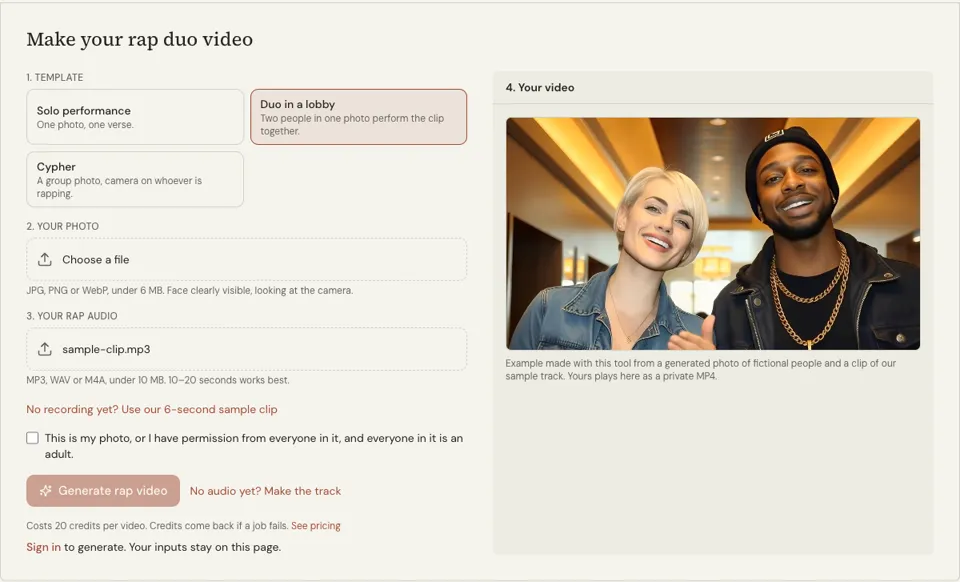
What this rap duo AI video maker does
The page opens with the Duo template selected. You upload a single image with both of you in it and one audio clip of the rap. The video maker animates the photo to the audio and returns a short lip-synced MP4 with both of you in frame. In our test run both faces in the photo moved their lips to the same audio, so a single clip shows the two of you performing the lines together, in unison.
It is made for pairs: you and a friend, you and a sibling, two members of a group. Both faces need to be clearly visible and turned toward the camera. The photo can be JPG, PNG or WebP under 6 MB, and the audio MP3, WAV or M4A under 10 MB, with 10 to 15 seconds as the sweet spot.
The tool does not write a song and does not invent a second rapper. The voices are whatever is in your audio, and the faces are the two people in your picture. Solo and Cypher templates are one tap away if your photo has one person or a whole group.
Why use this rap duo video maker
One upload for both people
You do not need two separate portraits or any editing to place them side by side. A normal photo of the two of you together is the starting point.
Permission is part of the form
Before the button works you confirm that the photo is yours or that everyone in it agreed, and that both people are adults. Ask your partner first; it is their face too.
Short clip, clear cost
A duo video costs the same as a solo one: 20 credits up to 15 seconds, 40 up to 30. Rendering takes a few minutes, and credits are returned if it fails.
How to make a rap duo video
- 01
Check the Duo template
It is selected when the page loads. Leave it on Duo, labelled "Duo in a lobby", for a photo that has exactly two people in it.
- 02
Upload the photo and the audio
Add one picture with both faces visible, then a 10 to 20 second clip. Both of you will mouth it together; for a back-and-forth, run a clip per person with a photo cropped to that face.
- 03
Tick consent and generate
Confirm permission and age with the checkbox and press Generate rap video. Leave the tab open while it renders, then save the MP4.
How to shoot a photo for a two-person rap video
Stand shoulder to shoulder at the same distance from the camera so both faces are a similar size. Look into the lens, keep mouths uncovered and make sure light falls evenly on both of you. If one face is in shadow or half turned away, the lip sync on that side suffers.
Pick the audio for the effect you want. With both of you in the photo, both faces mouth the same clip, which suits a hook you shout together. For a back-and-forth, record each person’s bars as a separate file, make one clip per person from a photo cropped to their face, and join the clips in any video editor at the handover.
- Two people, both facing the camera
- Faces at a similar size and in the same light
- No microphones, hands or hair across the mouth
- One audio file per rapper, 10 to 15 seconds each
- A clean cut point at the end of a bar, if you join clips
Rap duo AI: framing and lighting that help both faces
Use the rear camera of a phone with a timer or a third person behind it. A selfie at arm’s length enlarges whichever face is nearer the lens. Set the camera at eye level, frame from the chest up and leave a little space above both heads. If one of you is much taller, sit down together or have the taller person bend the knees until the two pairs of eyes are close to level.
Face a window, or stand in open shade outdoors. Light from behind turns faces into silhouettes, and a ceiling lamp directly overhead puts shadows under the nose and lower lip. Take off sunglasses and push cap brims up. A relaxed expression with the mouth closed or slightly open is an easier starting point for moving lips than a frozen shout or a wide grin.
- Rear camera, eye level, timer or a friend
- Chest-up framing with space above both heads
- Window light or open shade in front of you
- No sunglasses, low brims or heavy filters
- A plain background, so the eye goes to the faces
Rap duo AI: plan a two-person concept, and ask your partner first
A duo clip works when a viewer can tell within a second how the two of you relate. Pick one relationship and let everything else follow from it: rivals trading boasts, siblings finishing each other’s sentences, a calm one and a loud one, a teacher and a student. Write it down as a single line, such as “two cousins arguing over who taught who”. That line decides the bars, the clothes and the expression each of you holds in the photo.
Next decide who the clip is for and what it should leave behind. A birthday message for a friend, a teaser for a song you are both on, and a joke for a group chat all need different words and a different amount of polish. Agree on it together so that neither of you is surprised by the result.
This is also the moment to ask, before any photo is taken. The second person is lending a face to a video in which their mouth will move to audio. Show them the words, tell them where the clip will be posted and whether it will stay up, and accept a no. The form asks you to confirm that everyone in the picture agreed and that both of you are adults, and that tick should describe a conversation that really happened. If your partner changes their mind after posting, take the clip down.
When a render looks wrong: common causes and fixes
Most disappointing results trace back to the photo, and most can be predicted by looking at it for ten seconds before you upload. Zoom in on each mouth in turn. If you cannot clearly see both lips and the corners of the mouth on both people, the animation has little to work from. Credits come back if a job fails, but a finished clip you do not like is a different matter, so this check is the cheap step.
Change one thing at a time between attempts. If you swap the photo and the audio together, you will not know which change helped.
- A face turned to the side: retake with both noses pointing at the lens. A slight tilt of the head is fine, a profile is not.
- Sunglasses or a brim over the eyes: uncover the eyes, so the whole face is there to animate.
- Low light or a grainy night shot: move to a window or go outside in daylight and reshoot. Brightening a dark photo afterwards adds noise.
- One face much smaller than the other: stand level with each other, or crop so both faces fill a similar share of the frame.
- More than two people in the picture: crop to the two of you, or switch to the Cypher template, which is meant for a group.
- A hand, microphone, drink or scarf near the mouth: choose another frame from the same shoot.
- Audio with a long silence at the start: trim it so the first word arrives straight away.
Rap duo ai FAQ
How much does a rap duo video cost?
Twenty credits per video, with sign-in required. That is the same price as the solo template. If the render fails you get the credits back, and pack prices are on the pricing page.
Do I need two photos?
No. The Duo template uses one photo that already contains both people. Separate portraits are not combined for you, so take or choose a picture where you appear together.
Can the AI create a second rapper for me?
No. The video shows the people in your photo and plays the audio you upload. It does not generate a new face, a new voice or an original song. For audio, use the AI rap generator first.
Can I make a duo with a famous rapper?
No. Celebrity and real-artist likenesses are not allowed. You confirm that the photo is yours or that everyone in it has given permission, and that both people are adults, before the video can be generated.
What audio works for two people?
One file of 10 to 15 seconds in MP3, WAV or M4A, under 10 MB. Both faces mouth the whole clip, so a hook you rap together works best; a verse where you alternate needs one clip per person. It must be your own recording or a track you generated.
How long until the video is ready?
Expect a few minutes. The tab has to stay open during rendering. When it finishes, the clip plays in the result panel and the MP4 button downloads it.
Related reading
Related tools
AI Rap Video Generator
Upload a photo of yourself and a clip of your rap, and get a lip-synced MP4 of you performing it in a few minutes. Each video costs 20 credits up to 15 seconds, 40 up to 30.
AI Rap Generator
Paste your lyrics, pick a style and get a full rap track with vocals and a beat in under a minute. Each track costs 20 credits with one free redo; an eligible verified account can hear its first track free, limited to one per browser.
Rap Group Names
Press Generate and get five rap group names in about a second, including ones that state where you are from or how many members you have. Free, no sign-up, name box optional.
Rap Music Video Guide
After this guide you can plan a rap music video on one page, shoot it on a phone in an afternoon and cut it so the edits hit with the drums.
Last updated November 13, 2026