Rap Beat Maker
Press Play and a boom bap loop starts at 90 BPM. Tap squares on the 16-step grid to change the kick, snare, hats, clap and 808, then write to it. Free, no sign-up.
Free·No sign-up·5 rap presets·60–180 BPM
Make a rap beat
16 steps = one bar. Tap a square to add or remove a hit. WAV downloads 4 bars of what you hear; Save link puts the beat in the address so you can come back to it. All sounds are synthesised in your browser.
See it in action
What this rap beat maker is
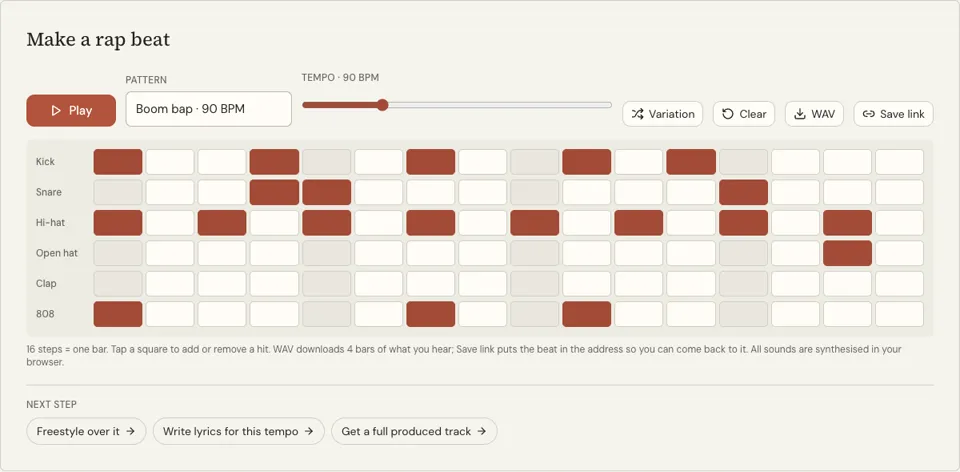
It is a step sequencer set up for rap: a grid of six rows and sixteen columns. Each row is a drum sound (kick, snare, hi-hat, open hat, clap and 808) and each column is a sixteenth note, so one pass across the grid is one bar. A lit square plays its sound when the playhead reaches it.
The page opens on the Boom bap pattern at 90 BPM, with a little swing built in so the kick on step 10 lands a touch late. The Pattern menu swaps in Trap at 140, Drill at 142, Lo-fi at 78 or West Coast at 96, and the Tempo slider moves anywhere from 60 to 180 BPM. Variation flips a few hi-hat, kick and 808 hits of the current preset; Clear empties the grid.
Every sound is synthesised in your browser, so no samples download and the loop starts at once. The WAV button saves four bars of your pattern as an audio file, and Save link keeps the grid in a web address. It is a place to build a rhythm, write bars over it and learn how rap drums are put together.
Why use this free rap beat maker
Five rap patterns to start from
You never face an empty grid unless you want one. Each preset is a working one-bar loop in its style, and changing two or three squares is enough to give it a different feel.
You hear every change at once
Tapping a square plays that sound and adds it to the loop without stopping playback. Tap a track name to audition the sound alone before you place it.
A loop that waits while you write
The bar repeats until you press Stop, with no account, no cost and no time limit. Leave it running while you draft a verse and you are writing to the pocket from the first line.
How to make a rap beat
- 01
Press Play
The boom bap loop starts and a ring moves across the grid to show the current step. Let it run for a few bars to learn where the kick and snare fall.
- 02
Change the pattern
Tap squares to add or remove hits. Try moving one kick, then adding an open hat. Use the Pattern menu to load another style, or Variation for a quick twist.
- 03
Set the tempo and rap
Drag the Tempo slider between 60 and 180 BPM until your verse fits. Then rap over the loop, or open the freestyle trainer for random words on top.
Where the kick and snare sit in a boom bap beat
Boom bap is named after its two main sounds: "boom" is the kick, "bap" is the snare. The snare owns beats two and four, steps 5 and 13 on this grid, and it almost never moves. The kick opens the bar on step 1 and then plays around the snare: here on step 7, two sixteenths after the first snare, and on step 10, a sixteenth after beat three.
Hi-hats tick in eighth notes on the odd steps, one open hat on step 15 lifts the end of the bar, and the 808 doubles the kick. Tempo usually falls between 85 and 95 BPM. At that speed there is space between hits, so small shifts of a single kick change the whole groove.
- Snare: steps 5 and 13, every bar
- Kick: step 1, then off-beat hits such as 7 and 10
- Hi-hat: every second step for eighth notes
- 808: under the kick, on the same steps
- Open hat: once per bar, late, as a lift
Writing bars to the pocket
At 90 BPM one bar lasts about 2.7 seconds, which is room for roughly 10 to 14 syllables. Aim your rhyme at the snare on step 13, the fourth beat, and let the syllables before it fall on or between the hats. That landing spot is what rappers mean by the pocket.
If your words keep tripping, slow the slider by five BPM before you rewrite anything. If the verse drags, speed up until the last word of each bar reaches the snare without you stretching it. Then keep that tempo for the whole song.
Rap beat maker FAQ
Is the rap beat maker free?
Yes. The drum machine is free with no sign-up and no credits, and you can leave it looping for a whole writing session. Only the AI tools that render audio or video files use credits.
Can I download the beat?
Yes, as a WAV. Press WAV and four bars of the boom bap loop you hear download to your device, free. It is not an MP3 and not a full song. Save link copies an address that reopens the pattern. For a produced instrumental with melody, the AI beat maker makes a downloadable track for 4 credits.
Does it work on a phone?
Yes. The grid scrolls sideways on narrow screens and the squares respond to taps. Sound starts when you press Play, because browsers only allow audio after a touch or click.
What do the six tracks sound like?
Kick is a low thump, snare a sharp crack, hi-hat a short tick and open hat a longer hiss. Clap is a burst that layers well with the snare, and 808 is a deep bass tone that rings for about half a second.
What does the Variation button do?
It reloads the selected preset and flips a random handful of hi-hat, kick and 808 steps, always keeping a kick on step 1. Snare, clap and open hat stay as the preset has them. Press it again for another version.
Can I save my pattern?
Yes. Press Save link and the grid and tempo go into the page address, which is copied for you. Open that link later, or send it to someone, and the same beat loads. Without a saved link, a reload brings back the preset.
Related reading
 How to Mix Vocals With Instrumental Online FreeMix vocals with instrumental online free: upload your beat, record the take in a browser, set voice and beat levels, fix timing, then export a WAV.
- Rap Beats for Beginners: What to Rap Over and BuildRap beats for beginners: which tempo and drums to rap over first, and how to build a boom bap and a trap pattern on a free 16-step grid in ten minutes.
Related tools
AI Beat Maker
Pick a style, press Generate beat and get a rap instrumental in about a minute, with no vocals, as an MP3 download. Each beat costs 4 credits.
Freestyle Beats
Press Play and a West Coast drum loop starts at 96 BPM and keeps going until you stop it. Set the tempo, switch the pattern and rap. Free, no sign-up.
Trap Beat Maker
Press Play for a 140 BPM trap loop with rolling hi-hats, a clap on beat three and an 808 under the kick. Edit any of the 16 steps. Free, no sign-up.
Make Rap Beats
You will be able to read a 16-step grid, program a boom bap and a trap drum pattern from memory, and place a bass line that follows the kick.
Lofi Beat Maker
Press Play for a slow, swung drum loop at 78 BPM, then tap the 16-step grid to reshape it. Six drum tracks, free, no sign-up.
Last updated November 12, 2026